Trinity Kernel Toolbox1.9.58
Publisher Description
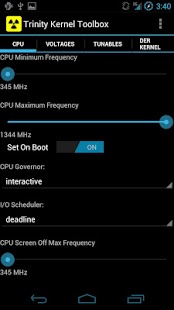
The Trinity Kernel Toolbox aims at augmenting the Trinity Kernel experience.
Supported:
Nexus 5, Nexus 4, Nexus 7 / Nexus 7 3G (Tegra 3)
Nexus 10, US Note 2, TMO Note3
Galaxy Nexus (VZW/GSM/SPRINT), Nexus S / Nexus S 4G
Requirements: Device must be rooted and SuperSU and BusyBox (by Stericson) must be installed in the rom and be up-to-date. (A kernel supporting these features is *required*.)
If Settings don't seem to stick:
Update to latest SuperSU, start it and let it update its 'su' binary.
Get Stericson's Busybox installer and let it update busybox.
Reboot.
Set your desired settings.
Exit the app.
Reboot.
Now sit tight, do not start Trinity Kernel Toolbox yet.
Wait for the toast that Trinity Kernel Toolbox was given root.
Now check your settings were applied.
The app supports the following:
- Adjusting of CPU Min/Max Frequencies
- Selecting of CPU Governor
- CPU Governor settings
- Selecting of I/O Scheduler
- Adjusting of Max Screen Off Frequency (Galaxy Nexus only)
- Adjusting of all CPU Voltages
- Sound control: High Performance toggle + Volume boost (Galaxy Nexus only)
- Color control (Galaxy Nexus + Nexus 4 Only)
- Contrast control (Galaxy Nexus Only)
- Adjusting of Vibration Strength (Galaxy Nexus and Nexus 4 only)
- USB Fast Charge Toggle (with plug check)
- Thermal Throttle Toggle (Galaxy Nexus only)
- Smart Reflex Autocomp Toggles (Galaxy Nexus only)
- Wifi PM Toggle (Steadier stream or better battery) (GN + N7 only)
- Menu with utility functions to make common tasks easier.
- Reboot Widgets to access common options from Homescreen
- CPU Temperature Widget (Galaxy Nexus + SGS3 + Nexus 7)
- Statusbar Temperature display on select widgets (GN + SGS3 + Nexus 7)
- Restores trivial settings on boot
- Frequency/Voltage settings restored on boot if chosen
- Crash Recovery (To get you out of boot loops)
- Optimizes system independent from init.d (Great for stock roms)
- Localized for Korean, German, Italian, Russian, Simplified Chinese (ROM must support languages)
It further provides easy in app access to derkernel.com, however, this is not a kernel Updater, It's a collection of tools to allow tweaking the kernel parameters to fit one's needs.
Please email me before leaving one star ratings.
About Trinity Kernel Toolbox
The company that develops Trinity Kernel Toolbox is Daniel Goller. The latest version released by its developer is 1.9.58. This app was rated by 7 users of our site and has an average rating of 3.1.
To install Trinity Kernel Toolbox on your Android device, just click the green Continue To App button above to start the installation process. The app is listed on our website since 2014-01-03 and was downloaded 101 times. We have already checked if the download link is safe, however for your own protection we recommend that you scan the downloaded app with your antivirus. Your antivirus may detect the Trinity Kernel Toolbox as malware as malware if the download link to com.derkernel.tkt is broken.
How to install Trinity Kernel Toolbox on your Android device:
- Click on the Continue To App button on our website. This will redirect you to Google Play.
- Once the Trinity Kernel Toolbox is shown in the Google Play listing of your Android device, you can start its download and installation. Tap on the Install button located below the search bar and to the right of the app icon.
- A pop-up window with the permissions required by Trinity Kernel Toolbox will be shown. Click on Accept to continue the process.
- Trinity Kernel Toolbox will be downloaded onto your device, displaying a progress. Once the download completes, the installation will start and you'll get a notification after the installation is finished.
Program Details
System requirements
Download information
Pricing
Version History
version 1.9.58
posted on 2014-01-03
v1.9.58:,- Fix protection of max frequency on non qualcomm devices.,- Work around KitKat bug where the service doesn't get restarted if app is swiped from recent apps list.,- Manage cores more aggressively on screen off on Nexus 5 and Note 3
version 1.9.22
posted on 2013-02-11
Several fixes and updates
